

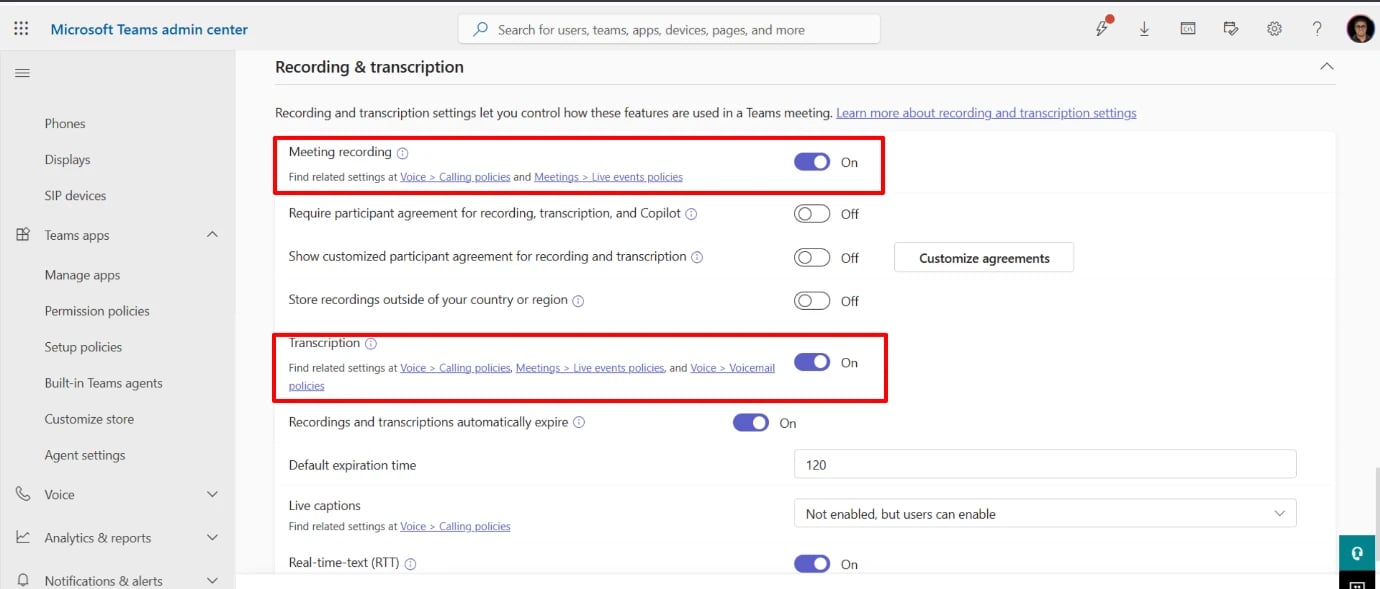
Turn on recording & transcription
In the Teams Admin Center, as your organization’s Global or Teams admin, go to Meetings → Meeting policies (Global, or whichever policy your users are on) and set:- Recording → On
- Transcription → On
- Include speaker attribution → On (this triggers a personal-data-exposure confirmation popup — accept it to continue)
Grant the bot Application Access
This part isn’t in the Teams Admin Center UI — it’s PowerShell only, and assumes the recording/transcription policy above is already set.1
Connect to the tenant

2
Verify recording & transcription programmatically
Don’t assume the UI toggle persisted — check it explicitly:Both should read 
True.3
Check for an existing Application Access Policy
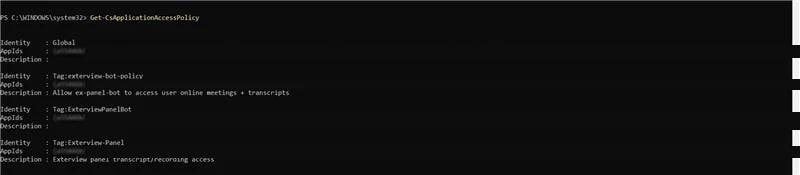
4
Create the policy, if none covers your app ids
-AppIdsonSet-CsApplicationAccessPolicyreplaces the whole list — always include every app id you want kept, not just the new one.-Globalhas a real, sometimes multi-minute propagation delay. A blank result onGet-CsOnlineUser -Identity <email> | Select-Object ApplicationAccessPolicyright after granting is not proof of failure — sample 2-3 more users before concluding it didn’t work.-Globalnever overrides a user who already has an individual policy assigned.- If uncertain or time-pressured, grant directly to the specific organizer instead — this applies instantly, no propagation wait: